AI agent tool design: build tools a model can actually use
What is AI agent tool design? 54 measured runs across nine tool layers. One number in a directory listing cut a task from $1.01 to 3 cents.

In what an AI agent harness is I called tools the hands, and in Build your first AI agent harness in Node.js I wired three of them into a working agent in 139 lines of plain Node.js. Both essays treated a tool as a function you expose. That is the half everyone gets right. The other half is that a tool is also a piece of writing, read by a model in the middle of a job, and the two halves fail differently. A badly built tool is wrong even when used perfectly. A badly written one never gets called, or gets called wrong.
This essay measures both halves. I swapped nine tool layers through one frozen harness: 54 runs on one debugging task, every layer on Claude Haiku 4.5 and five of them on Opus 5 as well. All 54 runs fixed the bug. What the layers changed was the bill, by 46× on the median run, and the change that did it was not the one I would have bet on. Readers of the context engineering essay will recognise the failure: one oversized tool result wrecking a session’s budget. That essay fixed it by capping what the harness accepts, and the cap worked there. Here I got the same rescue without the cap ever firing, from one number in a directory listing.
What is tool design in an AI agent?
AI agent tool design is the practice of shaping the four things a model actually sees about a tool: its name, its description, its input schema, and what it returns, along with the behaviour of the function underneath. The function is the part the model never sees. Everything else is prompt.
Two distinct things can go wrong, and most teams only debug one of them. Engineers ship a well-built tool the model never reaches for. Prompt-focused people polish a description on a tool that corrupts data the moment it is retried. You need both halves right, and the experiment below prices them separately.
What the model sees, and what it sends back
Three JSON objects carry the whole interaction. First, the definition you send:
{
  "name": "read_file",
  "description": "Read the contents of a file in the project folder.",
  "input_schema": {
    "type": "object",
    "properties": { "path": { "type": "string", "description": "Relative file path" } },
    "required": ["path"]
  }
}
Second, what comes back when the model wants to use it. Note that this is a request, not a call:
{ "type": "tool_use", "id": "toolu_01…", "name": "read_file", "input": { "path": "convert.js" } }Third, what your harness sends back after running the function:
{ "type": "tool_result", "tool_use_id": "toolu_01…", "content": "…", "is_error": true }That’s it. The model emits a name and a JSON object. It has never seen your function, your types, your tests or your docs. Everything it used to choose that name and fill that object was text you wrote, and content plus is_error is the entire channel you have for telling it what happened.
Every vendor’s tool call is the same four strings
There is no standard envelope, but there is a real standard one layer down: JSON Schema. Every major provider takes a name, a description and a schema, and hands back a name plus arguments.
| Anthropic | OpenAI | Gemini | |
|---|---|---|---|
| Declare | tools: [{name, description, input_schema}] | tools: [{type:"function", function:{…}}] | tools: [{functionDeclarations:[…]}] |
| Model asks | {type:"tool_use", id, name, input} | tool_calls[].function.arguments | {functionCall:{name, args}} |
| You answer | {type:"tool_result", tool_use_id, content, is_error} | {role:"tool", tool_call_id, content} | {functionResponse:{name, response}} |
| Arguments arrive as | a parsed object | a JSON string | a parsed object |
| Schema dialect | JSON Schema | JSON Schema | OpenAPI 3.0 subset |
Read the Anthropic tool use docs, OpenAI function calling and Gemini function calling side by side and the differences are plumbing. The contract is not, and that is why tool design survives a model swap when almost nothing else in a harness does. One practical gotcha: OpenAI hands you arguments as a string, the others as an object. Parse tool arguments; never string-match on them.
MCP does not change any of this. It standardises how a harness discovers and transports tools; the tool inside an MCP server is still a name, a description and a JSON Schema. MCP ships your four strings somewhere else. It does not write them.
Not every tool is yours to describe
Some tools you never write a word for. Anthropic’s bash and text-editor tools are declared as { "type": "bash_20250124", "name": "bash" }: no description, no schema. The model knows the interface from training, and you only implement the back end. Define your own tool called bash with your own schema and it is a different tool, with none of that behaviour. Others, like web search and code execution, the provider both defines and runs.
None of them are on by default. No model calls anything you didn’t declare in that request. Send no tools array and it can do exactly one thing: emit text.
The experiment: nine tool layers, one frozen harness
The test project is the weather station from the context essay, rebuilt with a freshly generated dataset, so the figures differ from the ones quoted there. Its report.js averages a 5,760-row, 238 KB CSV without excluding the -999 rows the logger writes when a sensor drops out, and prints a mean temperature of -21.89 °C when the truth is 18.38 °C. The agent’s task is to find that and fix it. A checker runs the script, compares the output against an answer stored outside the project, and fails the run if the raw data was edited, because deleting the sentinel rows also produces the right number and is the wrong fix.
The harness is frozen: same loop, same minimal system prompt, same stop conditions for every run. A turn is one model call, and the whole history is resent each turn. The only thing that changes between runs is the tool layer, meaning the set of tool definitions and what they hand back. Nine layers, lettered in the order I built them; H and I came last, after the first results raised questions the original seven could not answer.
| Layer | What changed from the baseline | |
|---|---|---|
| A | baseline | terse descriptions, bare errors, whole-file returns, 5 tools |
| B | described | descriptions saying when to call each tool and what returns |
| C | granular | 12 one-job tools instead of 5 |
| D | actionable errors | errors that name the failure and the next move |
| E | shaped returns | caps on reads, searches and command output, plus sizes in the listing |
| F | strict | strict: true with additionalProperties: false |
| G | all together | B + D + E + F combined |
| H | granular, fixed | C with its one ambiguous tool rewritten |
| I | sizes only | byte sizes in list_dir. Nothing else. |
The baseline’s five tools are list_dir, read_file, search, run_command and edit_file. The granular layer splits reading, searching and running into single-job variants (read_lines, head_file, tail_file, search_content, search_files, run_node, run_shell) and adds write_file and file_info. Three runs per layer on Haiku 4.5, and three each of A, C, E, G and H on Opus 5. The baseline and layer I later went to nine Haiku runs each, because they carry the headline.
What this design can and cannot show. Four layers change exactly one thing against the baseline: B, D, F and I. Those carry the causal weight, and the clean comparison is A against I, nine runs a side, on Haiku. The rest corroborate or bound it. C is not a pure test of tool count, because splitting five tools into twelve also added abilities the baseline lacks, including a file_info tool that reports exactly the size information layer I isolates. E bundles six changes, and one of them had a bug: its capped read_file told the model to call again with an offset I never declared in the schema. The implementation would have honoured the parameter, but no run ever passed it, and under G’s strict the call would have been rejected outright. G bundles four layers. Opus never ran layer I, so the isolated size result is Haiku’s alone. And nothing here set cache_control, so every token count below is uncached and the recurring costs are upper bounds. That includes the headline: with prompt caching on, the resent file would mostly be cheap cache reads, so the dollar gap narrows even though the token gap and the behaviour gap stand.
Tell the model what a call will cost
One comparison in the experiment is clean: the baseline against layer I, nine runs a side, identical in every string except the listing. The baseline’s list_dir returns bare names. Layer I appends one number:
baseline:   readings.csv
layer I:    readings.csv  (238332 bytes)
In the implementation it is one line, and the stat call was already sitting there:
const entries = await readdir(target, { withFileTypes: true });
const rows = await Promise.all(entries.map(async (e) => {
  if (e.isDirectory()) return `${e.name}/`;
  const s = await stat(path.join(target, e.name));
  return `${e.name}  (${s.size} bytes)`;   // baseline: return e.name;
}));
return rows.join("\n");
Here is what that number did. Given bare names, 9 runs out of 9 called read_file("readings.csv") and pulled all 238,332 characters into the context. Given the size, 8 runs out of 9 never opened the file with read_file at all. They pulled what they needed through run_command instead, grep in all eight and head -20 readings.csv in seven of them, a few hundred bytes at a time, and fixed the bug just the same. list_dir was the first call in every one of the 54 runs, so the size was on the table before the choice was made.
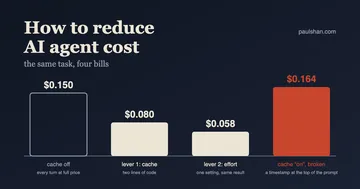
The token bill follows from that near-binary choice. The model is stateless, so the harness resends the whole conversation on every turn, and a 238 KB file read on turn three gets paid for again on every turn after it. Median of nine runs a side: 1,004,922 input tokens without the size, 21,627 with it. In money, $1.01 a run became 3 cents. On means the gap is 8.8× rather than 46×, because the one sized run that read the file anyway drags the average up on its own.
Is the baseline rigged? Partly. ls -l has printed file sizes since the seventies, and a listing without them is a listing missing its most useful column. But I did not strip the sizes to set up a result. I wrote the terse tool first, the way quick tools get written, and found out what the omission cost when the bills came in. If your listing tool already returns sizes, this exact 46× is not sitting in your harness waiting for you. The transferable part is the principle: the model chooses its next call from whatever your previous return values told it, so put the price of the expensive call in the cheap call that comes before it. A byte size, a row count, a match count. Whether a warning in the description does the same job is untested here; the sizes rode in a return value the model was already reading.
Placement seems to be the point, and the granular layers show it from the other side. They carried a file_info tool that returns exactly this size on request, so the information was available in all six of their Haiku runs. Five of the six never called it. Four of those swallowed the file whole by their third, fourth or fifth tool call; the fifth got by on a 20-line head and a search. The one run that did call it had already peeked at the file with a 20-line read. On this evidence, cost information works when it is pushed into a return the model is already reading, and mostly goes unrequested when it has to be pulled through a separate tool. Six runs against nine, and not a controlled pair, so treat that as a lead rather than a law.
The result also killed my own explanation of it. I had built the sophisticated version of the fix as well: read_file capped at 200 lines, with a note telling the model how to page through the rest. That cap is the repair the context essay reached for, and I assumed it was doing the work here too. It never fired. Across the 12 runs of the two capping layers, E and G on both models, not one called read_file on the CSV, because those layers also show sizes and the model skipped the read entirely. The size and the cap do different jobs. Information changes what the model chooses, eight runs in nine. The cap bounds the damage on the ninth. I had built only the cap, and credited it with the work of the size.
Opus is not immune either. I expected the stronger model to check before swallowing a 238 KB file, and it did not: given bare names it read the file whole in all three of its baseline runs, took more turns than Haiku, and paid $6.39 a run doing it. Given the shaped bundle it ran for 21 cents. The sizes-only layer never ran on Opus, so the one-variable claim stays Haiku’s; that gap is the first thing I would close with a few more dollars of runs.
Name things the model can only read one way
The writing half produced the experiment’s other lesson, and it cost four dead tool calls to learn. The granular layer splits the baseline’s five tools into twelve, and I defined one of them like this:
{ "name": "run_node", "description": "Run a node script.",
  "input_schema": { "type": "object",
    "properties": { "script": { "type": "string" } }, "required": ["script"] } }
Read script as a developer and it means the path to a script. That is what my implementation assumed: node ${input.script}. Read it as the model did and it means the source of a script:
[model] Now I can see the problem! The issue is in the `mean` function… run_node({"script":"\n// Quick check to verify the issue\nconst data = [-999, 10…"}) -> Error: command failed with code 1[model] Let me check the actual calculation in the readings: run_node({“script”:“\nconst fs = require(‘fs’);\n\n// Load the data\nconst…”}) -> Error: command failed with code 1
[model] Let me try with a simpler approach: run_node({“script”:“\nconsole.log(“Testing the problem:”);\nconsole.log…”}) -> Error: command failed with code 1
[model] Let me check if there’s a Node.js issue and just examine the code…
Three failures in a row, and the model concluding there was “a Node.js issue”, because Error: command failed with code 1 gave it nothing to correct with. It had diagnosed the real bug one turn earlier. Across that run it called run_node four times, every one failed, and a third of its twelve tool calls went to a misreading.
So I ran layer H: the same twelve tools with that one tool rewritten. run_node(script) became run_node_file(path), and its description gained one sentence: “Takes a file path, not source code.” On Haiku that took the layer from 12.0 turns to 7.0 and from 2.7 errors to none, under the five-tool baseline on both counts. On Opus it pulled turns from 12.0 back to the baseline’s 10.0, though errors stayed above the Opus baseline. Three runs a side is the same sample I dismiss as noise in the scoreboard, so hold the exact deltas loosely; what makes this one worth reporting is that the mechanism is on tape. The transcript above shows, call by call, where the wasted turns went.
The granular layer had looked like proof that more tools are worse. It was not. Count is a proxy. Every tool you add is one more chance to write a name with two honest readings, and I took my chance on the ninth tool. Tokens are murkier for this pair, because the granular layers bundle other changes; the design notes above bound what they can prove.
What good looks like
The described layer’s read_file, exactly as it ran. The description says when to call the tool, not just what it does, and the argument documents itself:
{
  "name": "read_file",
  "description": "Read a text file from the project and return its contents. Call this before editing a file so you can copy exact text, and to inspect data files. Returns the file as plain text.",
  "input_schema": {
    "type": "object",
    "properties": {
      "path": { "type": "string",
        "description": "File path relative to the project root, e.g. \"report.js\" or \"docs/sensor-faq.md\"." }
    },
    "required": ["path"]
  }
}
And the actionable-errors layer’s response to a mistyped path, where the baseline said Error: ENOENT:
No file at "reprot.js" (resolved to reprot.js). Files in that folder with
similar names: report.js, README.md, docs. Call list_dir on the folder to
see what exists, then retry with an exact path.
Neither of these moved the numbers, as the scoreboard will show. Write them anyway. They cost little to get right once, and they are what saves the run where something does go wrong.
What a description costs
Definitions ride in the prefix of every request. Measured with the token-counting endpoint on Haiku 4.5:
| Tool layer | Tools | Tokens per turn |
|---|---|---|
| Terse | 5 | 790 |
Terse + strict | 5 | 825 |
| Properly described | 5 | 1,175 |
| Twelve granular tools | 12 | 1,218 |
Proper descriptions cost 385 extra tokens on every turn on Haiku, and 489 on Opus’s tokenizer, for as long as the session runs. Uncached that is real money; with the prompt prefix cached it shrinks to a fraction. Worth it when a description prevents a wasted turn. Not worth it as decoration.
Strict pins shape, not sense
strict: true with additionalProperties: false guarantees the arguments validate against your schema exactly, and every vendor has a version of it. Turn it on, and expect little from it: it constrains the shape of a call, never its meaning. A schema-valid call can still pass the wrong path, or a date outside the range you meant. Semantic validation is still yours to write, and it lives in the error message.
The scoreboard: one lever moved, three didn’t
In these tables a turn is one model call, and an error is a tool result the layer returned with is_error set. Turns, errors and output tokens are means; input tokens and cost per run are medians, at list prices, uncached. Read the three-run cells as records of what happened, not stable estimates: the nine-run baseline alone spread 4.7× across identical runs.
Claude Haiku 4.5. Three runs per layer; A and I have nine.
| Layer | Turns | Errors | Input tokens | Output | Cost per run |
|---|---|---|---|---|---|
| A baseline | 8.9 | 1.2 | 1,004,922 | 1,350 | $1.01 |
| B described | 7.7 | 0.7 | 1,008,178 | 1,142 | $1.01 |
| C granular | 12.0 | 2.7 | 1,009,794 | 2,317 | $1.02 |
| D actionable errors | 8.0 | 0.7 | 1,003,401 | 1,240 | $1.01 |
| E shaped returns | 8.3 | 0 | 19,322 | 1,197 | $0.03 |
| F strict | 7.7 | 0.7 | 1,005,487 | 1,042 | $1.01 |
| G all together | 8.7 | 0 | 26,346 | 1,187 | $0.03 |
| H granular, fixed | 7.0 | 0 | 672,777 | 1,102 | $0.68 |
| I sizes only | 8.4 | 0.1 | 21,627 | 1,196 | $0.03 |
Claude Opus 5. Three runs per layer.
| Layer | Turns | Errors | Input tokens | Output | Cost per run |
|---|---|---|---|---|---|
| A baseline | 10.0 | 0 | 1,265,037 | 2,507 | $6.39 |
| C granular | 12.0 | 1.7 | 1,460,625 | 3,805 | $7.42 |
| E shaped returns | 9.7 | 0.3 | 26,626 | 3,329 | $0.21 |
| G all together | 9.0 | 0.3 | 29,407 | 2,286 | $0.20 |
| H granular, fixed | 10.0 | 0.7 | 1,091,926 | 2,725 | $5.52 |
Three deliberate improvements did nothing to the bill. In these runs the described, actionable-errors and strict layers landed within half a percent of the baseline’s input tokens. Their turn and error numbers wobble (B averaged 7.7 turns to the baseline’s 8.9, and B and D each averaged 0.7 errors to its 1.2), but at three runs a layer that is noise, not a result. I had predicted error text would be the biggest lever in the set. On cost, it did not register.
Strict had nothing to fix. Across all 54 runs and both models there were zero schema-invalid argument sets and zero calls to tools that don’t exist. On tools this small, the guarantee it sells was already holding.
And every run passed: 54 for 54. Tool design never decided whether the job got done. It decided the price, and the predictability of the price. Nine identical baseline runs ranged from 502,737 to 2,347,808 input tokens. The nine sizes-only runs stayed between 13,235 and 25,990, except the one that read the file anyway and cost 1,008,683. A harder task might turn tool design into a pass-or-fail lever; this one could not, and I am not going to pretend otherwise.
Software engineering when the caller has judgment
The callers we spent our careers designing for did what they were told. The reflexes that grew around them are the ones I reached for here: validate the input, constrain the range, cap the output. Make the contract precise, and stop the caller doing anything stupid. Those reflexes are not wrong now, but in this experiment they came second, and it was not close. The cap never fired. The schema guarantee had nothing to catch. What paid was the opposite move: not restricting what the caller may do, but informing what it decides.
A model deciding its next call has exactly what your tools have told it, and nothing else. The two fixes that worked were both corrections to a false belief. The model believed readings.csv was worth opening; a byte size corrected that. It believed run_node wanted source code; a name corrected that. The three changes that did nothing were explanations of things it already had right.
Which makes tool design a diagnostic job before it is a writing job. You will not find the false belief by rereading your own definitions. They look correct to you, because you wrote them and you know what you meant; script was obvious to me. You find it in the transcripts: the moment the model makes an expensive or pointless choice, and the question of what it would have needed to know, right then, to choose differently. A stack trace tells you why the code broke. A transcript tells you why the model decided. Deciding is now the expensive part.
Common AI agent tool design mistakes
The first three are what the runs measured. The rest is engineering judgment, untested here.
- Letting the model discover cost by paying it. Put the price in the cheap call that comes first: a byte size, a row count, a match count. Cap the big returns anyway, as the safety net for the run that ignores the price.
- Parameter names with two honest readings.
script,file,query,target. If a developer and a model can read one differently, one of them will.run_node_file(path), notrun_node(script). - Errors with no information.
Error: command failed with code 1gives the model nothing to correct with. Return the real stderr and name the next move. One caveat from the data: better error text alone moved nothing here. It earns its keep when stacked on a wrong belief, so fix the names first. - Forgetting the description rides in every request. 385 tokens a turn on Haiku for five well-described tools. Cache the prompt prefix, or keep paying it.
- Assuming a write arrives once. The model retries. Dedupe on a key, or check before you write.
- Hidden state. A tool that depends on a current directory or a “currently selected” anything is unpredictable to a caller that cannot see them. Make it stateless.
- Trusting the arguments. Paths from the model are untrusted input, on reads too. Resolve them and confine them to the project root.
- Assuming
strictmeans correct. It pins the shape of the arguments, never their meaning.
A tool is an API whose only consumer is a reader that cannot ask a follow-up question, and will pay for anything you fail to mention. Design the four strings for that reader. Tell it what a call costs before it makes one. And build the function as if it will be called twice.