Demystifying MCP in AI: it's way thinner than you think
What is MCP (Model Context Protocol)? A thin, standard layer over APIs you already have. Explained with diagrams, then built in Node.js and tested.
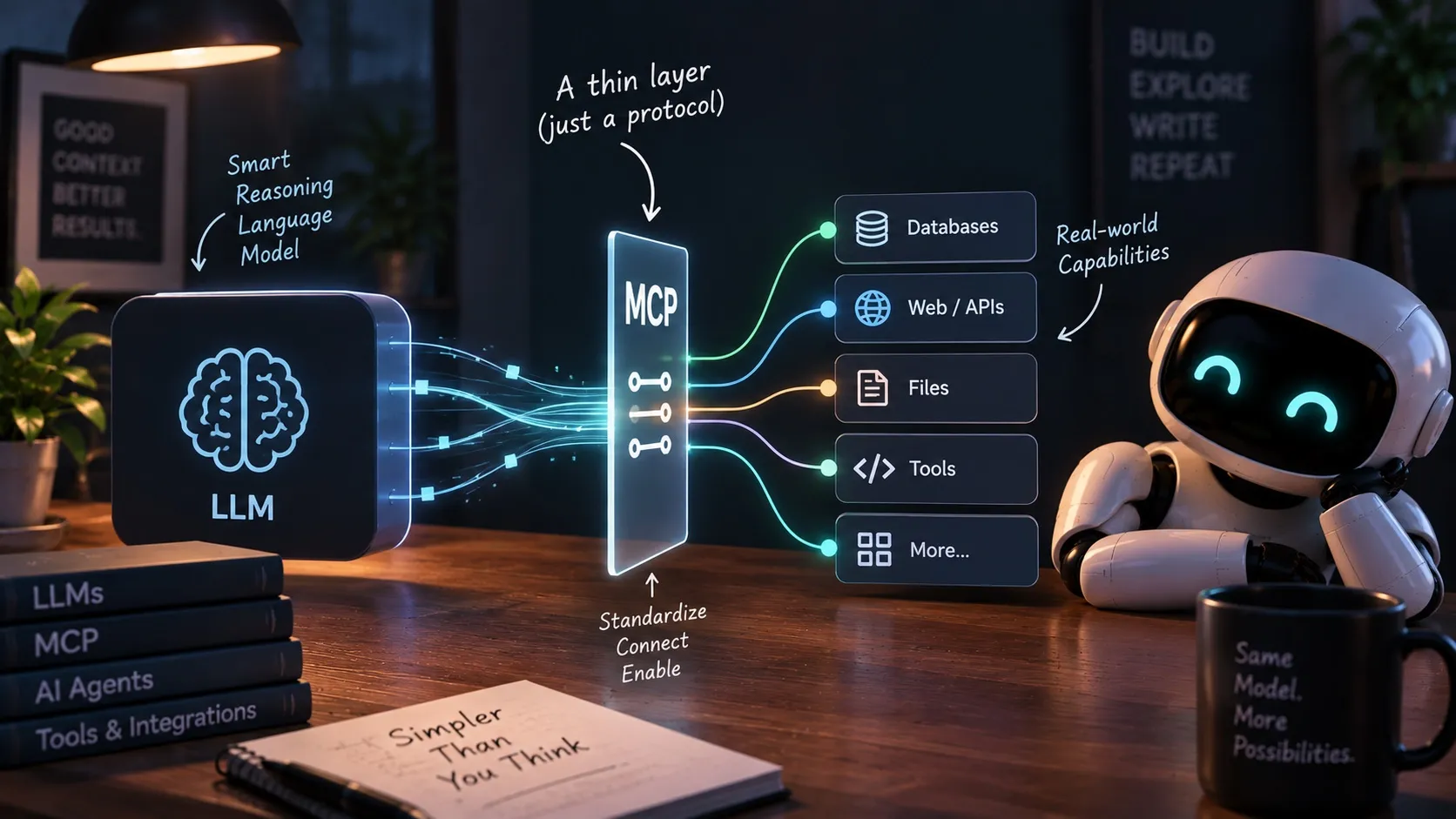
Ask what MCP is, and most answers make it sound like a new capability for AI. It isn’t one. The Model Context Protocol is a standard way for an AI app to find out what tools exist and call them. Underneath, it’s a thin layer over APIs and functions you already have. There’s no model in it and no intelligence in it.
Two misunderstandings come up again and again. The first is about what MCP is: people imagine something smarter than it is. The second is about what an MCP server exports: people expect their product’s intelligence to travel with it. It doesn’t.
This essay covers both. Then I build an MCP server in Node.js, on top of the harness from my earlier Node.js build, and test every claim with real runs. In the harness anatomy this series uses, tools are the hands. MCP is how you make them plug-in hands.
What is MCP?
MCP (Model Context Protocol) is an open protocol that lets any AI application discover and call tools from any server that speaks it. Anthropic released it in November 2024. OpenAI, Google and Microsoft now support it in their agent products, and so do most coding agents.
That’s the whole definition. The rest is detail.
The problem it solves
Before MCP, if you wanted Claude Code, ChatGPT and your own agent to use GitHub, Slack, your database and a weather API, someone had to write the glue for every pair. Each app had its own tool format, its own way to call things, its own way to return results. Three apps and four tools meant twelve integrations, each maintained separately.
MCP turns that into one plug. Each tool is wrapped once as an MCP server. Each app implements the client side once. Twelve becomes seven.
The bigger win is who does the maintenance. If you connect to GitHub’s MCP server, the integration is GitHub’s problem, not yours. When they add a tool or change one, your agent sees the new list the next time it connects. You don’t update an SDK, rewrite glue code or redeploy anything. With a plain API, every change on their side is a ticket on yours.
The flip side is the same fact: their change reaches your agent without your review. For hosted servers from vendors you trust, that’s the point. For third-party servers running on your machine, pin the version.
It’s the USB argument. The wiring inside a USB plug is trivial. Its value is that every laptop and every device agreed on the same one.
How MCP works
This is the diagram that clears up most of the confusion.
Three pieces:
- The harness is the MCP client. Claude Code, ChatGPT, Cursor, or your own agent. It connects to servers, asks what tools they have, and forwards calls.
- The MCP server is a wrapper. It lists its tools with a name, a description and an input schema, and runs a tool when asked.
- The transport is how they talk. For a local server, it’s stdio: the harness launches the server as a child process and they exchange JSON over stdin and stdout. There’s no port and no URL. For a remote server, it’s HTTP.
The model sits outside all of this. The harness takes the tools it got from MCP and hands them to the model as ordinary tool definitions, the same format as tools you’d hardcode. When the model asks to use one, the harness forwards the call to the server. The model never knows MCP was involved.
A server can offer three kinds of things: tools (actions), resources (data the client can read) and prompts (reusable templates). Tools are what almost everyone uses, so that’s what this essay is about.
What’s actually on the wire
Here’s the server I build later in this essay, driven by hand. No SDK on the client side, just three lines of JSON piped into its stdin:
$ printf '%s\n' \
  '{"jsonrpc":"2.0","id":1,"method":"initialize","params":{"protocolVersion":"2025-11-25","capabilities":{},"clientInfo":{"name":"by-hand","version":"1.0.0"}}}' \
  '{"jsonrpc":"2.0","method":"notifications/initialized"}' \
  '{"jsonrpc":"2.0","id":2,"method":"tools/call","params":{"name":"run_command","arguments":{"command":"node convert.js"}}}' \
  | node server.mjs
And what came back on stdout:
{"result":{"protocolVersion":"2025-11-25","capabilities":{"tools":{"listChanged":true}},"serverInfo":{"name":"station","version":"1.0.0"}},"jsonrpc":"2.0","id":1}
{"result":{"content":[{"type":"text","text":"23.555555555555557\n"}]},"jsonrpc":"2.0","id":2}
A handshake, then a function call and its return value. That’s MCP for the common case. The spec has more in it, which I’ll get to, but nothing in it thinks.
Build an MCP server in Node.js
The starting point is my Node.js harness from earlier in this series: 139 lines with three tools built in. read_file, run_command and edit_file, a loop, and a permission gate on the two risky tools. It fixed a Fahrenheit-to-Celsius bug in convert.js.
The plan: move those three tools out of the harness into an MCP server, connect the harness to the server, and fix the same bug again. Then add two new tools to show what a typical server looks like.
You need Node.js and two packages: the official MCP TypeScript SDK (I used @modelcontextprotocol/sdk 1.30) and zod for the input schemas.
npm install @modelcontextprotocol/sdk zodThe server: the same three hands, wrapped
// server.mjs
import { config } from "dotenv";
import Anthropic from "@anthropic-ai/sdk";
import { McpServer } from "@modelcontextprotocol/sdk/server/mcp.js";
import { StdioServerTransport } from "@modelcontextprotocol/sdk/server/stdio.js";
import { z } from "zod";
import { readFile, writeFile } from "fs/promises";
import { exec } from "child_process";
import { promisify } from "util";
import path from "path";

config({ path: new URL(".env", import.meta.url), quiet: true });
const ROOT = process.cwd();
const execAsync = promisify(exec);
const text = (t) => ({ content: [{ type: "text", text: t }] });

const server = new McpServer({ name: "station", version: "1.0.0" });

// The same three hands as the Node.js harness. The function bodies didn't change.
server.registerTool(
  "read_file",
  {
    description: "Read the contents of a file in the project folder.",
    inputSchema: { path: z.string().describe("Relative file path") },
  },
  async ({ path: p }) => {
    const target = path.resolve(ROOT, p);
    if (!target.startsWith(ROOT)) return text("error: path escapes the project folder");
    return text(await readFile(target, "utf-8"));
  }
);

server.registerTool(
  "run_command",
  {
    description: "Run a shell command in the project folder and see its output.",
    inputSchema: { command: z.string().describe("Shell command to run") },
  },
  async ({ command }) => {
    try {
      const { stdout, stderr } = await execAsync(command, { cwd: ROOT, timeout: 10_000 });
      return text(stdout + stderr || "(no output)");
    } catch (err) {
      return text(`error: ${err.message}`);
    }
  }
);

server.registerTool(
  "edit_file",
  {
    description: "Replace one exact snippet of text in a file with new text. old_str must appear exactly once.",
    inputSchema: {
      path: z.string(),
      old_str: z.string().describe("Exact text to find"),
      new_str: z.string().describe("Text to replace it with"),
    },
  },
  async ({ path: p, old_str, new_str }) => {
    const target = path.resolve(ROOT, p);
    if (!target.startsWith(ROOT)) return text("error: path escapes the project folder");
    const contents = await readFile(target, "utf-8");
    const occurrences = contents.split(old_str).length - 1;
    if (occurrences === 0) return text("error: old_str not found in file");
    if (occurrences > 1) return text(`error: old_str appears ${occurrences} times, must be unique`);
    await writeFile(target, contents.replace(old_str, new_str), "utf-8");
    return text("file updated");
  }
);

// … two more tools, below …

await server.connect(new StdioServerTransport());
Compare it with the harness version and the difference is small. Each function is wrapped in registerTool(). The input schema is written in zod instead of raw JSON Schema. The return value goes into { content: [{ type: "text", text }] }. The last line connects the server to stdio. That’s the MCP layer.
Notice what’s missing: the permission gate. run_command runs whatever it’s given. That’s on purpose, and I’ll come back to it.
Two more hands: an API wrapper, and a tool with AI inside
A real MCP server usually wraps an API that already exists. So the server gets a fourth tool, get_forecast, a thin wrapper over Open-Meteo, a free weather API. It serves a made-up weather station in Edinburgh. The forecast it returns is real.
const STATION = { name: "Edinburgh weather station", latitude: 55.95, longitude: -3.19 };

async function forecast() {
  const url =
    `https://api.open-meteo.com/v1/forecast?latitude=${STATION.latitude}&longitude=${STATION.longitude}` +
    "&daily=temperature_2m_max,precipitation_probability_max,precipitation_sum,wind_gusts_10m_max" +
    "&timezone=auto&forecast_days=7";
  const { daily } = await (await fetch(url)).json();
  return daily.time.map((date, i) => ({
    date,
    max_temp_c: daily.temperature_2m_max[i],
    rain_chance_pct: daily.precipitation_probability_max[i],
    rain_mm: daily.precipitation_sum[i],
    max_gust_kmh: daily.wind_gusts_10m_max[i],
  }));
}

server.registerTool(
  "get_forecast",
  {
    description: `Get the 7-day forecast for the ${STATION.name}: temperature, rain, and wind gusts per day.`,
    inputSchema: {},
  },
  async () => text(JSON.stringify(await forecast(), null, 2))
);
The fifth tool, weather_verdict, has an LLM inside it. It fetches one day’s forecast, sends it to Claude Haiku 4.5 with a fixed prompt, and returns a one-line verdict:
// A fifth hand with AI inside: a fixed prompt, a fixed model, one job.
// The caller never sees the prompt. It only gets the verdict back.
const anthropic = new Anthropic();

server.registerTool(
  "weather_verdict",
  {
    description: `Get a one-line verdict on whether a given day is good for outdoor work at the ${STATION.name}.`,
    inputSchema: { date: z.string().describe("Date as YYYY-MM-DD, within the next 7 days") },
  },
  async ({ date }) => {
    const day = (await forecast()).find((d) => d.date === date);
    if (!day) return text(`error: no forecast for ${date}, use a date in the next 7 days`);
    const response = await anthropic.messages.create({
      model: "claude-haiku-4-5",
      max_tokens: 100,
      temperature: 0,
      system:
        "You rate one day's weather for outdoor work. Reply with exactly one line: " +
        "GOOD, RISKY, or NO, then a dash, then the reason in under 15 words.",
      messages: [{ role: "user", content: JSON.stringify(day) }],
    });
    return text(`${date}: ${response.content[0].text}`);
  }
);
The whole server, five tools, is 124 lines.
The harness: plug the hands in
The harness loses its three tool functions and its hand-written tool definitions. In their place, it launches the server, asks it for its tools, and forwards calls to it:
// harness.mjs (the parts that changed)
import { Client } from "@modelcontextprotocol/sdk/client/index.js";
import { StdioClientTransport } from "@modelcontextprotocol/sdk/client/stdio.js";

// Plug in the hands: launch the MCP server as a child process and connect over stdio.
const mcp = new Client({ name: "node-harness", version: "1.0.0" });
await mcp.connect(
  new StdioClientTransport({
    command: "node",
    args: [new URL("server.mjs", import.meta.url).pathname],
    cwd: process.cwd(),
  })
);

// Ask the server what hands it has, and translate them into Claude's tool format.
const { tools: mcpTools } = await mcp.listTools();
const tools = mcpTools.map((t) => ({
  name: t.name,
  description: t.description,
  input_schema: t.inputSchema,
}));

// The reflex stays here, in the harness. The server does the work,
// the harness decides whether the work is allowed.
const RISKY_TOOLS = new Set(["run_command", "edit_file"]);

async function executeTool(name, input) {
  if (RISKY_TOOLS.has(name)) {
    const label = name === "run_command" ? `run \`${input.command}\`` : `edit ${input.path}`;
    const allowed = await confirm(`Claude wants to ${label}.`);
    if (!allowed) return "error: user declined this action";
  }
  const result = await mcp.callTool({ name, arguments: input });
  return result.content.map((c) => c.text).join("\n");
}
The loop is unchanged. The translation from MCP to Claude’s tool format is a three-field map(): inputSchema becomes input_schema. The Anthropic SDK also ships an mcpTools() helper that does this for you, but there’s so little to it that writing it out is clearer.
The harness went from 139 lines to 83. The tool code didn’t disappear. It moved into the server, where any other harness can use it too.
Same bug, fixed through MCP
Reset convert.js to the broken version, and give the harness the same task as last time:
$ node harness.mjs "Read convert.js and run it with \`node convert.js\`. It should print the Celsius equivalent of 100°F, which is about 37.8. If it's wrong, fix convert.js and rerun it to confirm the fix worked."
I'll start by reading the file and running it to see what happens.
Claude wants to: read_file({"path":"convert.js"})
Claude wants to: run_command({"command":"node convert.js"})
  -> Claude wants to run `node convert.js`. allow? (y/n) y
The output is `23.56`, not `37.8`, so there's a bug.
…
Claude wants to: edit_file({"path":"convert.js","old_str":"  return (f * 5) / 9 - 32;","new_str":"  return ((f - 32) * 5) / 9;"})
  -> Claude wants to edit convert.js. allow? (y/n) y
Now let me rerun to confirm:
Claude wants to: run_command({"command":"node convert.js"})
  -> Claude wants to run `node convert.js`. allow? (y/n) y
**Fixed.** The script now prints `37.77777777777778`, which matches the expected ~37.8.
Same diagnosis, same one-line fix, same permission prompts. Every tool call went harness → MCP client → stdio → server → the same function as before.
The model can’t tell
I checked what the model actually receives, using the token-counting API on Claude Opus 5. Tool definitions for the three hardcoded tools from the old harness, and for the same three tools listed by the MCP server:
| Tool definitions | Tokens added to every request |
|---|---|
| Hardcoded in the harness | 611 |
| Listed by the MCP server | 683 |
Listed by the MCP server, $schema field removed | 611 |
The only difference is a $schema field the SDK adds to each input schema. It’s worth 72 tokens and carries no meaning for the model. Remove it and the definitions are identical to the token. From the model’s side, nothing changed.
Plug the same server into Claude Code
This is what the layer is for. The server doesn’t know or care which harness is on the other end, so Claude Code can use it with one command:
$ claude mcp add station -- node ~/station/server.mjs
Added stdio MCP server station with command: node ~/station/server.mjs to local config
$ claude mcp list
station: node ~/station/server.mjs - ✔ Connected
No code changes. Claude Code sees the tools as mcp__station__get_forecast, mcp__station__weather_verdict and so on (it prefixes each tool with the server name), and calls them the same way my harness does.
Two harnesses, one set of hands. So do they behave the same?
Same MCP, different AI, different answer
They don’t, and this is the misunderstanding that costs businesses the most.
At Anatta, we built an agentic OS, and we exposed an MCP server for it too. The work you can get done by talking to the system directly, you can’t get by connecting its MCP to Claude or ChatGPT. Same tools. Worse results.
The reason is simple once you see it: an MCP server exports hands, never the brain.
Inside our system, the brain is ours, and it’s much more than a model. The harness has its own intelligence: how it reads a request, plans, decides what to do next, when to act and when to ask. It picks the model too, per task, based on what the request needs. And it carries the context, memory, rules and skills built up from real work. The MCP tools are the hands that brain uses.
Connect the same MCP to Claude or ChatGPT, and the hands come along. The brain doesn’t. The other agent’s harness decides when to call a tool, what to pass it and what to do with the result. It does that with its own behaviour, its own model and its own context, none of which knows anything your system knows.
AI inside a tool is still a tool
This holds even when the tool itself uses AI. weather_verdict calls a model on the server, with a prompt the caller never sees. From the outside, it’s still one fixed job: a date goes in, a verdict comes out. The intelligence inside it is sealed. Whoever calls it can’t change the prompt, and the tool can’t decide anything beyond its one job.
So you can put real AI work behind an MCP tool: a classification, a summary, a verdict. The caller’s brain still decides when to call it and what to do with what it returns.
“Fixed job” doesn’t mean fixed words, though. I called weather_verdict three times for each of three days, at temperature 0. The label was RISKY all nine times. For Wednesday, the wording was identical every time. For Tuesday and Thursday, one of the three wordings differed:
2026-09-24: RISKY - Moderate rain, strong gusts (43 km/h), and cool temperature limit outdoor work safety.
2026-09-24: RISKY - Moderate rain chance, strong gusts at 43 km/h may hinder work safety.
2026-09-24: RISKY - Moderate rain chance, strong gusts at 43 km/h may hinder work safety.
The job is fixed. The exact output isn’t.
The test
An agentic OS is too big to show inside an essay, so here’s the same effect at small scale. The weather server from above stands in for a product’s hands. The task, given to three different brains:
Should I schedule the anemometer replacement at the weather station this week? It’s a one-day mast climb. Pick a day.
What get_forecast returned for the working week, identical for all three runs:
| Day | Max gust | Rain chance | Rain |
|---|---|---|---|
| Mon 21 Sep | 41.8 km/h | 43% | 0.3 mm |
| Tue 22 Sep | 41.8 km/h | 23% | 0 mm |
| Wed 23 Sep | 37.8 km/h | 51% | 0 mm |
| Thu 24 Sep | 43.2 km/h | 41% | 1.2 mm |
| Fri 25 Sep | 52.6 km/h | 43% | 0.6 mm |
Brain 1, the “product”: my harness, plus a system prompt with four team rules: the crew works weekdays only, no mast climbs when gusts exceed 40 km/h, light rain under 1 mm is fine, and always name one day. It’s a tiny stand-in for the knowledge a real product builds up and an outside agent never has.
Brain 2: Claude Code, with the same server connected, its built-in tools switched off, and only get_forecast and weather_verdict pre-approved.
Brain 3, a control: my harness again, with no rules at all. This shows whether the difference comes from the harness code or from what the brain knows.
All three ran on Claude Opus 5. Same model, same hands, same data.
| Brain | Tools it called | Answer |
|---|---|---|
| My harness + team rules | get_forecast, weather_verdict ×3 | “Yes — schedule it for Wednesday 23 September.” |
| Claude Code | get_forecast, weather_verdict ×4, run_command (blocked) | “No — I’d recommend not scheduling the climb this week.” |
| My harness, no rules | get_forecast, weather_verdict ×4 | “Short answer: no — I wouldn’t schedule it this week.” |
The three answers came from the same numbers.
With the rules, the answer is Wednesday: the only weekday under 40 km/h gusts, with 0 mm of rain. The tool rated Wednesday RISKY, and this brain overrode it, because it knew the policy the tool didn’t:
The generic advisory tool calls Wednesday “RISKY” — but on inspection its reasoning doesn’t hold against our policy. It cites the 51% rain chance and 37.8 km/h gusts. Our rule is on rain volume, not probability, and Wednesday’s forecast is 0 mm; 37.8 km/h is inside our 40 km/h ceiling.
Claude Code and the rule-less harness both did something sensible with what they had. They saw RISKY on every day, applied general industry practice, and said to wait a week. Claude Code even went looking for the missing knowledge. It tried to run ls -la through the server’s run_command to find a written wind threshold, and was blocked because I hadn’t allowed that tool. Its answer said so:
I tried to look in the project folder for a documented wind threshold or climb SOP, but the command permission wasn’t granted, so the 36–40 km/h figure above is a general industry norm rather than your team’s specific limit. If you have a written threshold, that should override my read.
Neither answer is wrong. They’re different, and the difference is entirely in the brain. The control makes that clear: my own harness code, without the rules, gave the same answer as Claude Code. The code didn’t matter. The model didn’t matter. What the brain knew did.
That’s why your MCP in someone else’s agent will never behave like your product. What makes your product good lives in your harness: how it behaves, which model it picks, the rules, the context, the memory, the judgment. None of that travels through MCP. Only the hands do.
It cuts both ways. If you’re worried that exposing an MCP gives away your product, it doesn’t. And if you expect customers to get your product’s results by plugging your MCP into ChatGPT, they won’t.
Is MCP just an API?
Mostly, yes. “A thin layer over APIs” is the right mental model, but it’s not the complete picture. A few things MCP does that a plain REST API doesn’t:
- The client learns the tools while it runs. With a REST API, a developer reads the docs and writes the integration. With MCP, the client calls
tools/listand gets names, schemas and descriptions written for a model. That’s why one client works with every server. The server can also announce that its list changed: my server’s handshake above included"tools":{"listChanged":true}without my asking. - Local servers are processes, not web services. A stdio server is a child process of the harness. It runs on your machine, with your files and your credentials, and needs no network at all.
- It’s a session. There’s a handshake where both sides agree on a protocol version (
2025-11-25above) and declare what they support. REST is stateless request and response. - The server can ask the client for things. It can ask the client’s model to generate text (sampling) or ask the user a question (elicitation). Note which way sampling goes: even when a server wants intelligence, it borrows the client’s brain.
- Remote servers have a standard auth flow, based on OAuth, so a hosted server doesn’t need its own custom login scheme.
None of these is intelligence. It’s plumbing that everyone agreed on, and the agreement is the valuable part.
What MCP costs
MCP’s costs are the same ones any tool has, but they’re easier to miss, because connecting a server takes one command and you never see what it adds.
Tokens, on every turn
Every tool definition from every connected server goes into the model’s context on every request. In the context engineering essay, tool definitions were part of the stable block that gets resent each turn. With MCP, you’re adding to that block without writing any of it.
I measured it by connecting my server plus four widely used public ones, one at a time: the official filesystem, memory and “everything” reference servers, and Microsoft’s Playwright server for browser control. Then I counted the tokens the tool definitions add to each request on Claude Opus 5:
Five servers, 66 tools, 14,024 tokens before the user has typed a word. That’s paid again on every turn of the loop. Playwright alone adds 6,841. If the task only needs two of those tools, you’re paying for 64 the model will never use, and giving it 64 more ways to get distracted.
Some harnesses now defer MCP tool definitions and load them only when the model searches for a tool. Claude Code does this, for example. If yours doesn’t, connect only what the task needs.
The same test turned up a second problem. With my server and the filesystem server connected together, the API rejected the request outright: tools: Tool names must be unique. Both servers have a tool called read_file. MCP doesn’t namespace tool names. The harness has to, which is why Claude Code prefixes every tool with its server name. My counting script had to do the same before it could finish.
Trust
A local MCP server runs with your permissions. My server’s run_command will execute any shell command it’s given, as me, on my machine. A third-party server you install with one npx command can do the same. (A remote server runs on the vendor’s machines instead, and can do whatever the account access you granted it allows.)
MCP itself never asks you before a tool runs. There’s no approval step in the protocol: the server executes every tools/call it receives. The spec says hosts must get your consent before invoking a tool, and then admits it can’t enforce that. So whether you’re asked depends entirely on the harness. My harness asks only for run_command and edit_file; read_file, get_forecast and weather_verdict run silently. Claude Code asks by default, but once you click “always allow” for a tool, or run it in a mode that skips prompts, it stops asking. Some clients auto-approve everything.
And tool descriptions go straight into the model’s context. A server’s description text is effectively part of your prompt. A careless or malicious server can steer your agent with it. This is a real way in for prompt injection.
That’s why the permission gate in my harness stayed in the harness when the tools moved to the server. The server supplies the hands. The harness decides what they’re allowed to do. In the test above, Claude Code’s own gate is what stopped its unapproved run_command call. The server would have run it.
Common MCP mistakes
- Expecting your MCP to carry your product. Your rules, context and judgment live in your harness, and they don’t travel. Fix: treat an MCP server as an API for other brains. If you want people to get your product’s results, give them your product.
- Building an MCP server nobody else will use. If the only client is your own harness, MCP adds a process and a protocol for nothing. Fix: keep plain functions until a second harness needs the tools.
- Connecting every server “just in case.” Five common servers cost 14,024 tokens on every turn. Fix: connect what the task needs, or use a harness that loads tool definitions on demand.
- Generic tool names.
read_filein two servers made the API reject the whole request. Fix: give tools specific names, and prefix them by server in the harness. - Writing descriptions for humans. A tool description is prompt text for the model. It decides whether the tool gets called at all. Fix: write it like an instruction: what it does, when to use it, what it returns.
- Putting the permission gate in the server, or nowhere. The server doesn’t know who’s calling or why. Fix: gate risky actions in the harness, where the decision to act is made.
- Installing third-party servers without reading them. A server runs as you, and its descriptions go into your prompt. Fix: read the code, pin the version, and treat it like any other dependency with shell access.
- Expecting an AI-inside tool to return identical output. At temperature 0, the same input still gave different wording. Fix: promise a fixed job, not fixed words. Return structured labels (
RISKY) that callers can rely on.
MCP is thin, and that’s exactly why it spread. Nobody had to agree on intelligence, only on a plug. What makes an agent good is still the brain and the harness around it.